



*is only included in AeroLab THB1S.

English
Aerolab MANUAL
KEY FEATURES
|
|
MAX/MIN DESIGN
MAX/MIN to show the highest and lowest temperature & humidity in a day
VISUALIZED VPD DESIGN
Special and visualized VPD design on display for growers
COMFORT RANGES
3 adjustable comfort ranges for temperature and humidity to show the environment condition
REMOTE CONNECTIONS
Support BLE 5.0 and support connection to VIVOSUN GrowHub E42/E42A/E25 to get WiFi Gateway
DUAL CHANNELS WITH SWISS SENSOR
Accurate Build-in Swiss Temperature/Humidity Sensor. Optional external sensor probe for dual channels
MULTIPLE INSTALLATION METHODS
Support mounting on the wall, kickstanding and hanging in tent
PRODUCT CONTENTS
| Image | Name | Quantity |
|---|---|---|
|
Smart Controller |
1pc |
|
AAA Batteries |
3pcs |
|
Wire Tie* |
1pc |
|
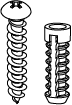
Expansion Screws |
1pc |
|
Temperature/Humidity Sensor* |
(3m) |
|
Strap |
1pc |
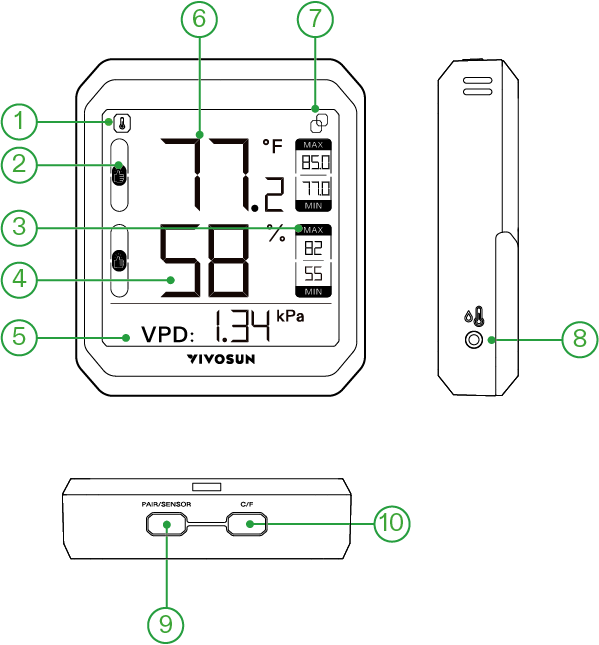
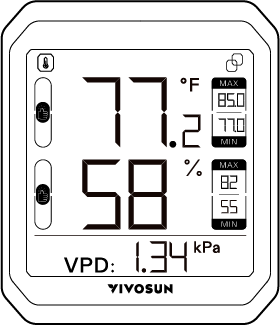
①Channel ②Comfort Ranges ③Max/Min ④Humidity
⑤VPD Value ⑥Temperature ⑦Connection Icon
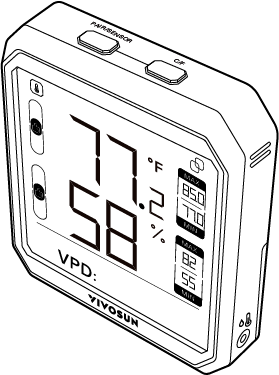
⑧2.5mm Jack for Senor Probe
⑨Pair/Channel Switch Button ⑩°C/°F Switch Button
Channel
 for build-in senor. If external temperature/humidity sensor is connected, you can switch to external sensor
MAX/MIN
Maximum/Minimum temperature and humidity readings in the past.
Comfort Ranges
The following is the default setting for comfort range icons.
|
79°F<Temp. 68°F≤Temp.≤79°F Temp.<68°F |
|
60%<Humid. 30%≤Humid.≤60% Humid.<30% |


VPD Value
VPD value is displayed directly to growers for reference.
Pair/Channel Switch Button
Press the button while pairing your device to the VIVOSUN App. If the external temperature/humidity sensor is connected you can press the button to switch the channel.
°F/°C Switch Button
Press this button to switch between °F and °C.
You can also long press this button for 3 seconds to clear the history data.
SPECIFICATIONS
| VS-THB1 | VS-THB1S | |
|---|---|---|
Product Dimensions |
3.31*2.81*0.79 in. |
|
Display |
2.33 * 2.33 in. LCD Screen |
|
Connectivity |
BLE 5.0 |
|
Working Temperature Range |
-4 °F-149°F(-20°C-65°C) |
|
Working Humidity Range |
0-100%RH |
|
Temperature Accuracy |
±0.9°F |
|
Humidity Accuracy |
±5% RH |
|
Bluetooth-Enabled Range |
50m (no obstructions) |
|
Data Refresh Speed |
2s |
|
Battery |
3 * AAA battery |
|
Battery Life |
1 year |
|
Data Storage |
2 year cloud storage |
|
App |
Vivosun App |
|
Data Export |
Support on App |
|
Alert |
Support on App |
|
Remote Connection |
Support connection to VIVOSUN GrowHub E42/E42A/E25 |
|
Installation |
Mounting, Kick Standing, Magnet & Hanging |
|
Sensor Probe Length |
--- |
3m |
INSTALLATION
Wall Mounting
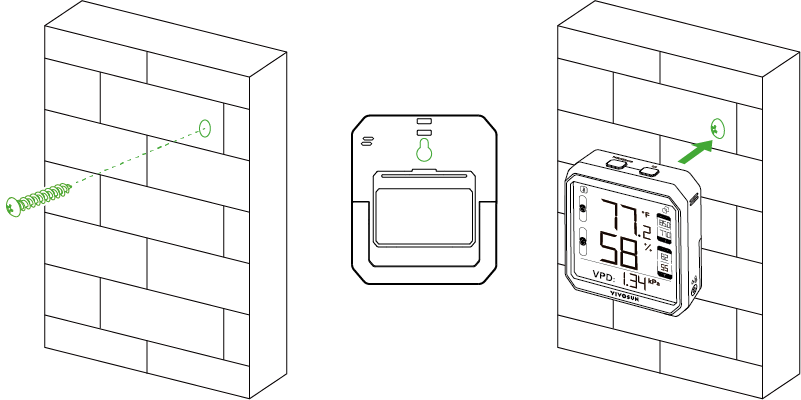
Drill a hole where you plan to mount the device. Then push the plastic expansion pipe in and screw the expansion screw. Now you can hang the device directly on the screw by sliding the slotted hanging hole over the screw and then allow the device to hang down.
Kickstanding
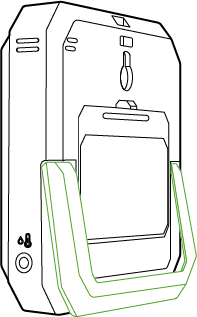
You can place the device on a level surface by the stand behind the device.
Hanging In Tent
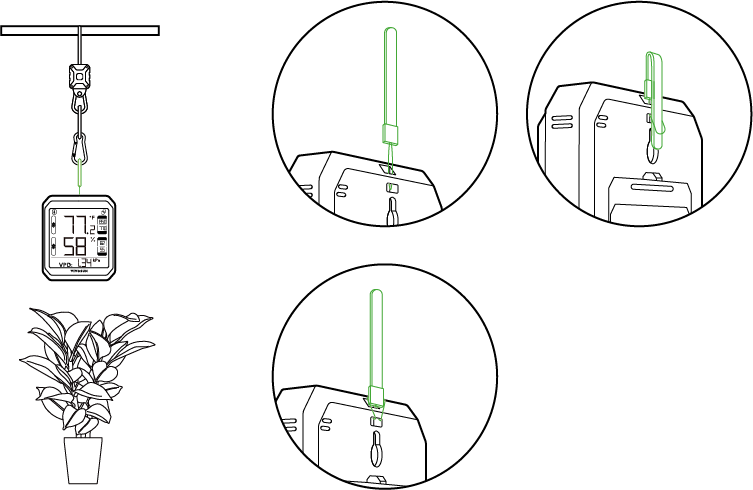
Thread the strap through the hole behind the device. Then you can hang the device in tent or wherever you want. It is better to hang the device above the canopy of plants to monitor the canopy temperature and humidity more accurately.
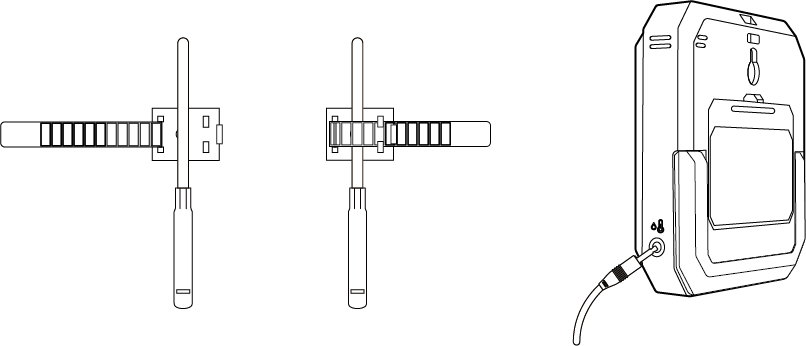
Temperature/Humidity Sensor Probe
Plug the temperature/humidity sensor probe into the 3.5mm jack. Then you can use the wire tie to secure the sensor probe.
OPERATION
Add the Device to VIVOSUN APP
Step 1. Download VIVOSUN APP
Search ''VIVOSUN'' in the Apple App Store or in the Google Play Store to download the VIVOSUN App. You can add AeroLab Thermometer Hygrometer to your Garden to work with your GrowHub Controller E42/E42A/E25 if you have.
Step 2. Turn on the Bluetooth
Turn on the VIVOSUN App and make sure the Bluetooth of your phone is turned on.
Step 3. Add device
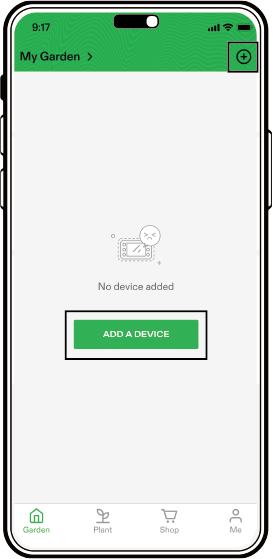
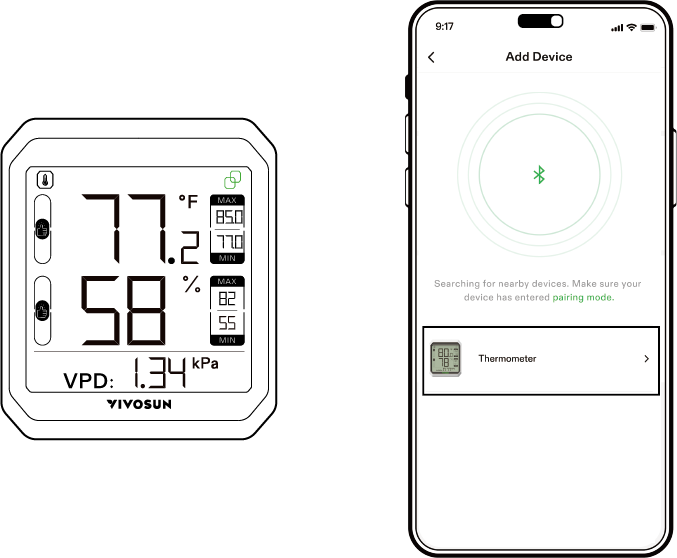
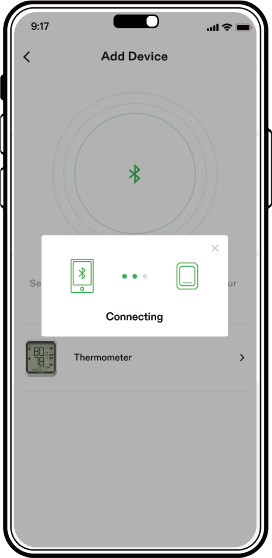
Tap ''ADD A DEVICE'' or to add the device. Long press PAIR/SENSOR button for 3 seconds to enter connection mode. You can see the connection icon on the device. Then this device will be showed on the app to do connection. Select the device, the App will connect the device automatically.
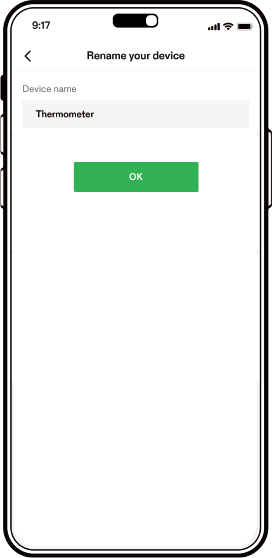
Step 4. Rename and finish Pairing
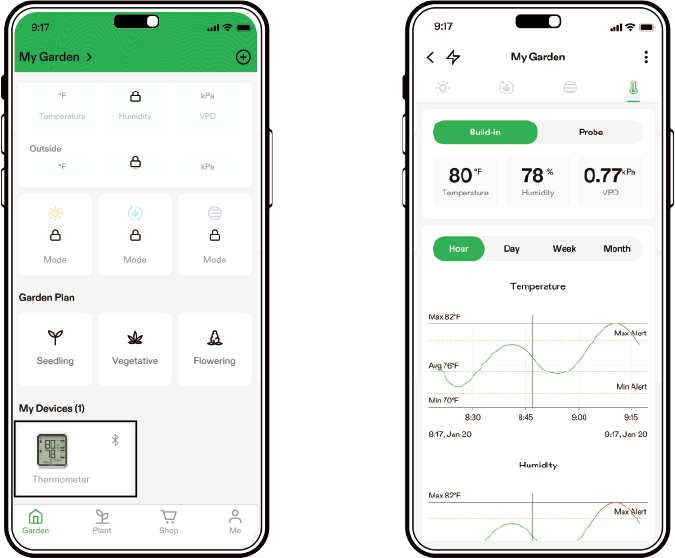
After pairing your device with VIVOSUN App, you can rename your device and check the temperature, humidity and data log on App.
WiFi Gateway by GrowHub
E42/E42A/E25
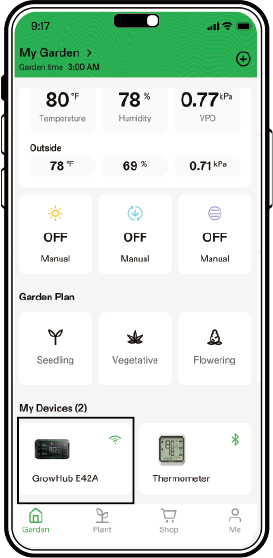
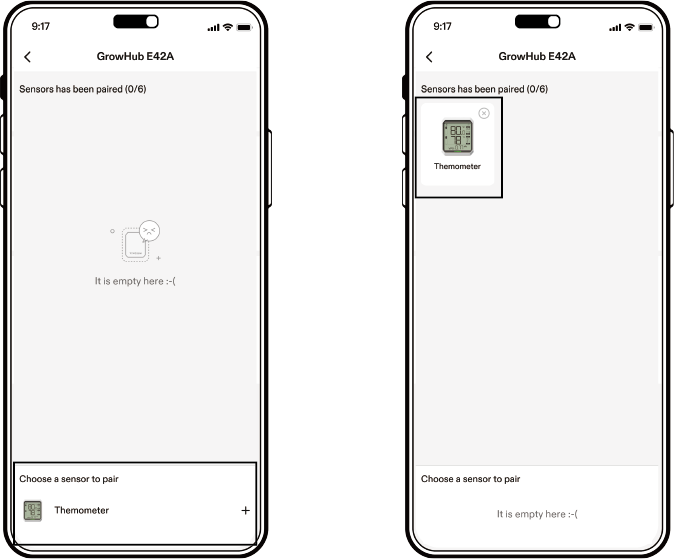
AeroLab THB1/THB1S can be added to GrowHub E42/E42A/E25 as sensor. GrowHub E42/E42A/E25 can be WiFi Gateway to AeroLab at the same time so that you can check the data remotely.
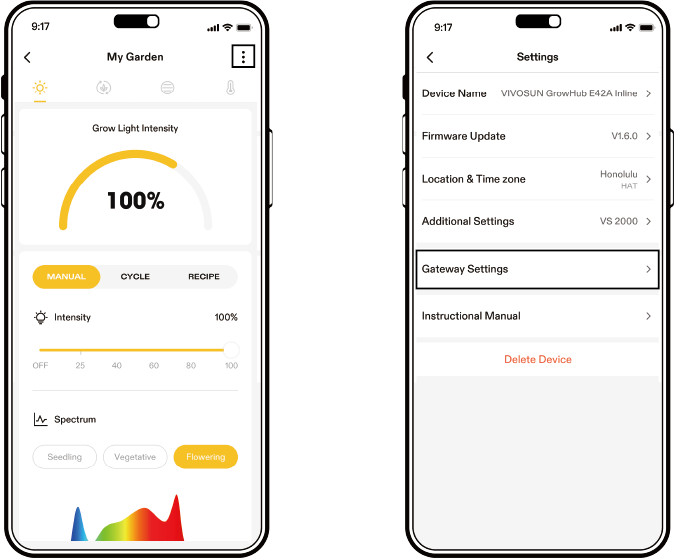
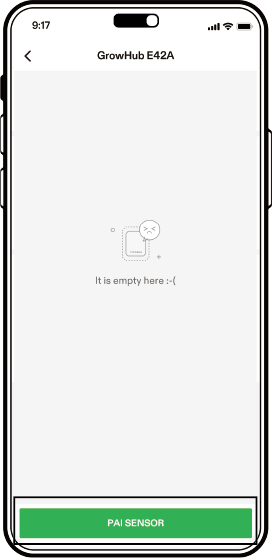
Step 1 Enter GrowHub E42/E42A/E25 page and go to Setting Page. Now you can see GrowHub E42/E42A/E25 Gateway Settings
Step 2
Press pair sensor to see the sensors you can pair. Select the sensor you want to pair and finish. You can pair up to 6 sensors.
Combo with GrowHub E25
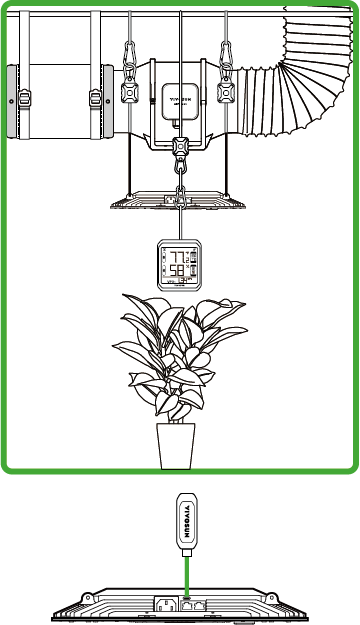
AeroLab THB1S can be combo with GrowHub E25. Pair AeroLab THB1S as a sensor to GrowHub E25. Then you can get a display and temperature/humidity sensor for GrowHub E25 and work with Vivosun AeroLight, AeroZesh and other VIVOSUN SGS device as you need. Just like a GrowHub E42/E42A.
Notice: Each device need one GrowHub E25.
WARRANTY
VIVOSUN provides a 2-year warranty against defects on all AeroLab purchased directly from us or through our authorized dealers. This policy serves as our commitment to promptly address any manufacturing defects or premature breakage that may occur during normal use of our products.
Our warranty covers the replacement or refund of purchases that exhibit material defects within two years of the original purchase date. In such events, customers may contact us to initiate the claim process. We will need proof of purchase to verify coverage eligibility. This policy does not extend to products that have been misused, abused, or purposefully damaged. It also does not cover normal wear and tear or cosmetic defects such as minor scratches.
Customers can rest assured knowing that our products undergo rigorous quality testing procedures. This 2-year warranty reflects our confidence in the durability of our products under normal use. If any product defects are found, customers are encouraged to contact us immediately. Your satisfaction is our priority, and we are committed to resolving any issues in a professional and timely manner.
WARNING
-
Do not expose the product to direct heat.
-
Do not use the product in Microwave Oven.
-
The sensor is an accurate Swiss temperature and humidity MEMS sensor, do not use the product in the rain or immerse the product in the water.
-
The sensor detect the air temperature and humidity through the side holes, do not cover them.
-
Keep the battery away from children and if you don’t use the product for a long time, please take out the batteries.
-
Do not disassemble or modify the device without VIVOSUN’s direction may cause damage to the device and will void the warranty.

Meaning of the ''Dustbin'' Symbol
-
Protect our environment: do not dispose of electrical equipment in the domestic waste.
-
Please return any electrical equipment that you will no longer use to the collection points provided for their disposal.
-
This helps avoid the potential e ects of incorrect disposal on the environment and human health.
-
This will contribute to the recycling and other forms of reutilisation of electrical and electronic equipment.
-
Information conceming where the equipment can be disposed of can be obtained from your local authority.
CAUTION: Batteries/rechargeable batteries must not be disposed of with household waste!
-
The batteries must be removed from the appliance.
-
Take spent batteries to the appropriate collection point or to a dealer. Your town or local authority can provide information about public
-
collection points. This symbol can be found on batteries/ rechargeable batteries which contain hazardous.

-
Pb = Contains Lead
-
Hg = Contains Mercury
-
Cd = Contains Cadmium
-
Li = Contains Lithium
Contents

We help you grow your best green.

We provide the highest quality.

We relentlessly pursue the future.

We make growing more enjoyable.

We support every grower.
Sign up and get 8% off your first order
©2026 Vivosun All Rights Reserved