
Vivosun
English

GrowHub A22S Manual

EN-eu

Safety Information

Read carefully! Safety is cool.

Please read the following information carefully before using this product. Failure to follow these safety instructions may result in serious injury and will release Vivosun from all liability and void all product warranties.

  1. Carefully review all instructions before installation and use.

  2. Confirm that your power source matches the product’s electrical specifications.

  3. Do not connect devices that exceed the product’s rated limits of 120–240V AC, 1800W, and 15A.

  4. Check local electrical codes for any additional safety requirements to ensure a compliant installation.

  5. Plug the product in securely and keep it out of reach of children.

  6. If you are unsure about the installation process, consult a licensed professional. Improper installation may void the warranty.

  7. Do not hardwire this product. Retrofitting may cause injury or damage and will void the warranty.

  8. This product is intended for dry, indoor use only. Do not use it in hazardous environments, including flammable, explosive, chemical-laden, or wet areas.

  9. Do not cover power cords with rugs, fabrics, or other materials.

  10. Do not insert fingers or foreign objects into any openings, as this may result in electric shock, fire, or damage. Do not block or tamper with the product during operation.

  11. Discontinue use immediately if the product malfunctions, has been dropped, or shows any signs of damage.

  12. Ensure the plug is fully inserted into the outlet before use.

  13. Do not disassemble the product, as this may cause damage or create safety hazards.

Specifications

Input

110–240V ~ 50 Hz

Rated Current

15A MAX FOR GENERAL USE

10A MAX FOR HEATER

MAX Total Output Power

1800 W FOR RESISTIVE LOAD

Working Temperature

-20°C – 45°C (-4°F – 113°F)

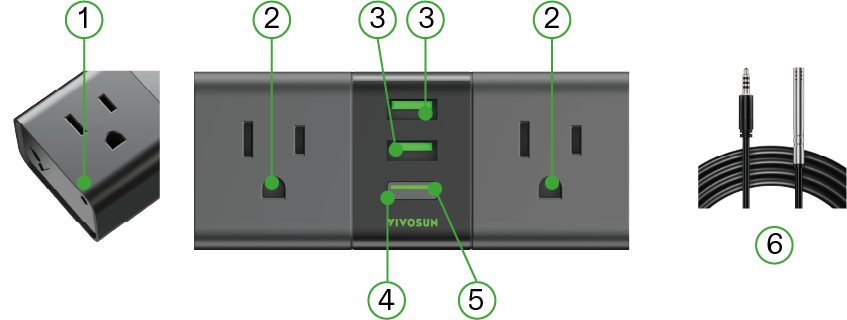
USB Port

TOTAL 5V 2A

Connectivity

IEEE 802.11 b/g/n, 2.4 GHz

LED Indicator

LED Indicator

Status

Fast Flashing White

Wi-Fi disconnected.

Solid White

Wi-Fi connected. Default Manual Mode selected in the Vivosun app.

Solid Green

Wi-Fi connected. Cycle/Auto/ Recipe Mode selected in the Vivosun app.

Alternating White & Green

Wi-Fi connected. Cycle/Auto/ Recipe Mode is changing to Manual Mode.

Slow Flashing Green/White

Offline

NOTE :

  1. The LED indicator will turn off after 5 seconds of operation to protect the plants. To check the LED indicator status, briefly press the Power Button to reactivate it.

  2. When the GrowHub A22S is offline, the LED indicator will slowly flash green and white continuously until it reconnects to the network.

Installation & Connection

Step 1

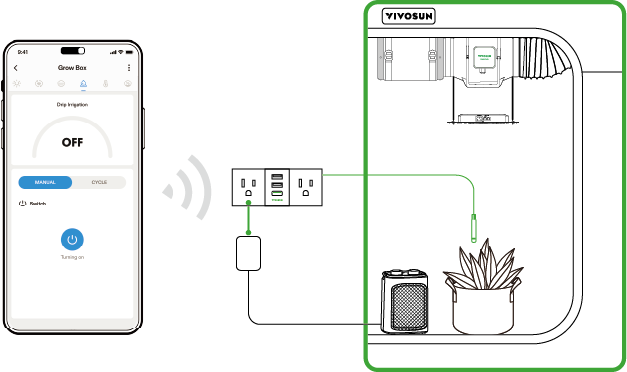
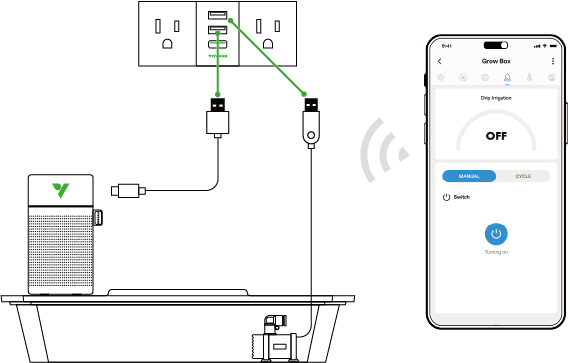
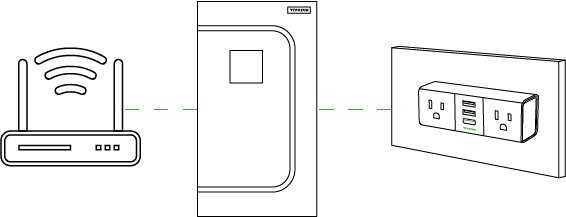
Plug the device into a mains outlet located outside the grow tent.

Note:

  1. Ensure the device is within 30m of the router.

  2. Minimize obstructions (e.g. walls, windows) between the device and the router.
Step 2

Connect GrowHub A22S to the Vivosun app

Step 2.1: Download the Vivosun app

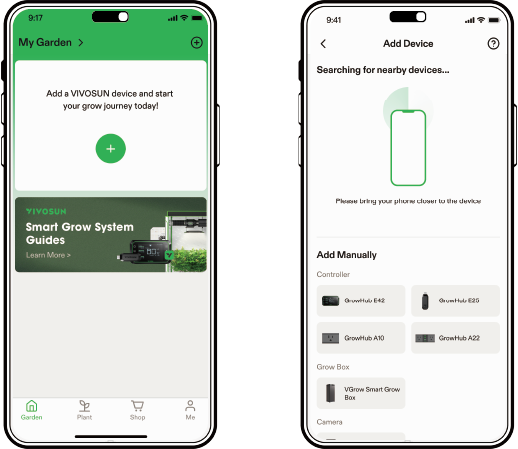
Search "Vivosun" in the App Store or Google Play Store to download the Vivosun app.

Step 2.2 Add GrowHub A22S

Tap "+" or " * " to add GrowHub A22S. When connecting to the Vivosun app, the LED indicator will flash white.

NOTE : Make sure you have a 2.4G WiFi connection and that Bluetooth is enabled on your phone.
Step 2.3 Name Your Device

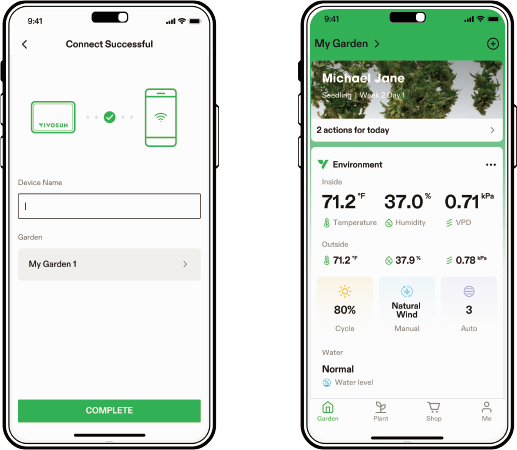
Once you’ve successfully connected your GrowHub, you can rename the device and start using it right away.

NOTE : You can either create a new Garden or add the GrowHub A22S to an existing one. It is fully compatible with other GrowHub Controllers.

All GrowHub Controllers in the same Garden will run the same recipe.
Operation

LOCAL FUNCTION OPERATION LED INDICATOR

Turn On/Off the device

Press the Power Button

White (Wi-Fi disconnected or Manual Mode)

Change Cycle/Auto/Recipe Mode to Manual Mode

Press and hold the Power Button for 3 seconds

Alternating white & green when holding the button; Changes to solid white after a successful change to Manual Mode

Restore to factory settings

Press and hold the Power Button for 6 seconds

Fast flashing white after successfully restoring to factory settings

More Information

Visit our website to learn more about the GrowHub A22S.

If you have any issues or questions, you can also contact us at https://vivosun.com/help/contact-us.

Warranty

Vivosun offers a two-year warranty on A22S purchased from us or authorized dealers, covering defects or premature breakage under normal use. If a material defect is found within two years of purchase, we’ll replace or refund the product. Proof of purchase is required to initiate the claim process.

This warranty excludes normal wear and tear, cosmetic defects, and damage from misuse or abuse. Our two-year warranty reflects our confidence in the quality and durability of our products.

DE

Sicherheitsinformationen

Bitte sorgfältig lesen! Sicherheit ist cool.

Bitte lesen Sie die folgenden Informationen sorgfältig durch, bevor Sie dieses Produkt verwenden. Die Nichtbeachtung dieser Sicherheitshinweise kann zu schweren Verletzungen führen und Vivosun von jeglicher Haftung freistellen sowie alle Produktgarantien ungültig machen.

  1. Lesen Sie vor der Installation und Benutzung alle Anweisungen sorgfältig durch.

  2. Stellen Sie sicher, dass Ihre Stromquelle mit den elektrischen Spezifikationen des Produkts übereinstimmt.

  3. Schließen Sie keine Geräte an, die die angegebenen Grenzwerte von 120–240V AC, 1800W und 15A überschreiten.

  4. Überprüfen Sie die lokalen Elektrovorschriften auf zusätzliche Sicherheitsanforderungen, um eine regelkonforme Installation sicherzustellen.

  5. Stecken Sie das Produkt sicher ein und halten Sie es außerhalb der Reichweite von Kindern.

  6. Wenn Sie unsicher bezüglich des Installationsprozesses sind, konsultieren Sie einen lizenzierten Fachmann. Eine unsachgemäße Installation kann die Garantie ungültig machen.

  7. Verändern Sie dieses Produkt nicht durch feste Verkabelung. Nachrüstungen können Verletzungen oder Schäden verursachen und die Garantie ungültig machen.

  8. Dieses Produkt ist nur für den trockenen Innenbereich bestimmt. Verwenden Sie es nicht in gefährlichen Umgebungen, einschließlich entzündlicher, explosiver, chemisch belasteter oder nasser Bereiche.

  9. Bedecken Sie keine Stromkabel mit Teppichen, Stoffen oder anderen Materialien.

  10. Stecken Sie keine Finger oder Fremdkörper in Öffnungen, da dies zu einem elektrischen Schock, Feuer oder Schäden führen kann. Blockieren oder manipulieren Sie das Produkt während des Betriebs nicht.

  11. Beenden Sie den Betrieb sofort, wenn das Produkt nicht funktioniert, heruntergefallen ist oder Anzeichen von Beschädigung zeigt.

  12. Stellen Sie sicher, dass der Stecker vollständig in die Steckdose eingesteckt ist, bevor Sie das Produkt verwenden.

  13. Zerlegen Sie das Produkt nicht, da dies Schäden oder Sicherheitsrisiken verursachen kann.

Spezifikationen

Eingang

110–240V ~ 50 Hz

Nennstrom

15A MAX FÜR ALLGEMEINE VERWENDUNG

10A MAX FÜR HEIZGERÄTE

MAX Gesamtausgangsleistung

1800 W FÜR WIDERSTANDSLAST

Betriebstemperatur

-20°C – 45°C (-4°F – 113°F)

USB-Anschluss

TOTAL 5V 2A

Konnektivität

IEEE 802.11 b/g/n, 2.4 GHz

LED-Anzeige

LED-Anzeige

Status

Schnelles Blinken Weiß

Wi-Fi getrennt.

Stetiges Weiß

Wi-Fi verbunden. Standardmäßiger manueller Modus in der Vivosun-App ausgewählt.

Stetiges Grün

Wi-Fi verbunden. Zyklus/Auto/ Recipe-Modus in der Vivosun-App ausgewählt.

Abwechselnd Weiß & Grün

Wi-Fi verbunden. Zyklus/Auto/ Recipe-Modus ändert sich in den manuellen Modus.

Langsames Blinken Grün/Weiß

Offline

HINWEIS:

  1. Die LED-Anzeige schaltet sich nach 5 Sekunden Betrieb ab, um die Pflanzen zu schützen. Um den Status der LED-Anzeige zu überprüfen, drücken Sie kurz die Einschalttaste, um sie wieder zu aktivieren.

  2. Wenn das GrowHub A22S offline ist, blinkt die LED-Anzeige kontinuierlich grün und weiß, bis es sich wieder mit dem Netzwerk verbindet.

Installation & Verbindung

Schritt 1

Stecken Sie das Gerät in eine Steckdose außerhalb des Pflanzzeltes.

Hinweis:

  1. Stellen Sie sicher, dass sich das Gerät innerhalb von 30 m vom Router befindet.

  2. Minimieren Sie Hindernisse (z.B. Wände, Fenster) zwischen dem Gerät und dem Router.

Schritt 2

Verbinden Sie das GrowHub A22S mit der Vivosun-App

Schritt 2.1: Laden Sie die Vivosun-App herunter

Suchen Sie im App Store oder Google Play Store nach "Vivosun", um die Vivosun-App herunterzuladen.

Schritt 2.2 Fügen Sie GrowHub A22S hinzu

Tippen Sie auf "+" oder " * ", um GrowHub A22S hinzuzufügen. Beim Verbinden mit der Vivosun-App blinkt die LED-Anzeige weiß.

HINWEIS: Stellen Sie sicher, dass Sie eine 2.4G WiFi-Verbindung haben und dass Bluetooth auf Ihrem Telefon aktiviert ist.

Schritt 2.3 Benennen Sie Ihr Gerät

Sobald Sie Ihr GrowHub erfolgreich verbunden haben, können Sie das Gerät umbenennen und sofort verwenden.

HINWEIS: Sie können entweder einen neuen Garten erstellen oder das GrowHub A22S zu einem vorhandenen hinzufügen. Es ist vollständig kompatibel mit anderen GrowHub-Controllern.

Alle GrowHub-Controller im selben Garten laufen mit dem gleichen Rezept.

Betrieb

LOKALE FUNKTION OPERATION LED-ANZEIGE

Gerät Ein/Ausschalten

Einschalttaste drücken

Weiß (Wi-Fi getrennt oder manueller Modus)

Zyklus/Auto/Recipe-Modus in manuellen Modus ändern

Drücken und halten Sie die Einschalttaste für 3 Sekunden

Abwechselnd weiß & grün beim Halten der Taste; wechselt nach erfolgreicher Änderung in den manuellen Modus zu stetigem Weiß

Auf Werkseinstellungen zurücksetzen

Drücken und halten Sie die Einschalttaste für 6 Sekunden

Schnelles Blinken weiß nach erfolgreichem Zurücksetzen auf Werkseinstellungen

Weitere Informationen

Besuchen Sie unsere Website, um mehr über das GrowHub A22S zu erfahren.

Bei Problemen oder Fragen können Sie uns auch unter https://vivosun.com/help/contact-us kontaktieren.

Garantie

Vivosun bietet eine zweijährige Garantie auf A22S, das bei uns oder autorisierten Händlern gekauft wurde, und deckt damit Defekte oder einen vorzeitigen Bruch bei normalem Gebrauch ab. Wenn innerhalb von zwei Jahren nach dem Kauf ein Materialfehler festgestellt wird, ersetzen oder erstatten wir das Produkt. Der Kaufnachweis ist erforderlich, um den Reklamationsprozess zu starten.

Diese Garantie schließt normalen Verschleiß, optische Mängel und Schäden durch Missbrauch oder unsachgemäße Verwendung aus. Unsere zweijährige Garantie spiegelt unser Vertrauen in die Qualität und Langlebigkeit unserer Produkte wider.

FR

Informations de Sécurité

Lisez attentivement ! La sécurité, c’est cool.

Veuillez lire attentivement les informations suivantes avant d’utiliser ce produit. Le non-respect de ces consignes de sécurité peut entraîner des blessures graves, dégager Vivosun de toute responsabilité et annuler toutes les garanties du produit.

  1. Lisez attentivement toutes les instructions avant l’installation et l’utilisation.

  2. Vérifiez que votre source d’alimentation correspond aux spécifications électriques du produit.

  3. Ne connectez pas d’appareils qui dépassent les limites nominales de 120–240V AC, 1800W et 15A du produit.

  4. Consultez les codes électriques locaux pour toute exigence de sécurité supplémentaire afin d’assurer une installation conforme.

  5. Branchez le produit en toute sécurité et gardez-le hors de portée des enfants.

  6. Si vous n’êtes pas sûr du processus d’installation, consultez un professionnel agréé. Une installation incorrecte peut annuler la garantie.

  7. Ne pas câbler ce produit en dur. La modification peut causer des blessures ou des dommages et annulera la garantie.

  8. Ce produit est conçu pour une utilisation en intérieur, dans un environnement sec uniquement. Ne l’utilisez pas dans des environnements dangereux, y compris dans des zones inflammables, explosives, chargées de produits chimiques ou humides.

  9. Ne pas couvrir les câbles d’alimentation avec des tapis, des tissus ou d’autres matériaux.

  10. Ne pas insérer les doigts ou des objets étrangers dans les ouvertures, cela pourrait provoquer un choc électrique, un incendie ou des dommages. Ne bloquez pas ou ne modifiez pas le produit pendant son fonctionnement.

  11. Arrêtez immédiatement l’utilisation si le produit ne fonctionne pas, a été tombé ou présente des signes de dommage.

  12. Assurez-vous que la fiche est entièrement insérée dans la prise avant l’utilisation.

  13. Ne démontez pas le produit, cela pourrait provoquer des dommages ou des risques pour la sécurité.

Spécifications

Entrée

110–240V ~ 50 Hz

Courant Nominatif

15A MAX POUR USAGE GÉNÉRAL

10A MAX POUR CHAUFFAGE

Puissance de Sortie Totale MAX

1800 W POUR CHARGE RÉSISTIVE

Température de Fonctionnement

-20°C – 45°C (-4°F – 113°F)

Port USB

TOTAL 5V 2A

Connectivité

IEEE 802.11 b/g/n, 2.4 GHz

Indicateur LED

Indicateur LED

Statut

Clignotement Rapide Blanc

Wi-Fi déconnecté.

Blanc Fixe

Wi-Fi connecté. Mode Manuel par défaut sélectionné dans l’application Vivosun.

Vert Fixe

Wi-Fi connecté. Mode Cycle/Auto/ Recette sélectionné dans l’application Vivosun.

Alternance Blanc & Vert

Wi-Fi connecté. Le mode Cycle/Auto/ Recette est en train de passer au Mode Manuel.

Clignotement Lent Vert/Blanc

Hors ligne

REMARQUE:

  1. L’indicateur LED s’éteindra après 5 secondes de fonctionnement pour protéger les plantes. Pour vérifier le statut de l’indicateur LED, appuyez brièvement sur le Bouton d’Allumage pour le réactiver.

  2. Lorsque le GrowHub A22S est hors ligne, l’indicateur LED clignotera lentement en vert et blanc en continu jusqu’à ce qu’il se reconnecte au réseau.

Installation & Connexion

Étape 1

Branchez l’appareil sur une prise secteur située à l’extérieur de la tente de culture.

Remarque:

  1. Assurez-vous que l’appareil est à moins de 30m du routeur.

  2. Minimisez les obstacles (par exemple, murs, fenêtres) entre l’appareil et le routeur.

Étape 2

Connectez le GrowHub A22S à l’application Vivosun

Étape 2.1: Téléchargez l’application Vivosun

Recherchez "Vivosun" dans l’App Store ou le Google Play Store pour télécharger l’application Vivosun.

Étape 2.2 Ajoutez le GrowHub A22S

Appuyez sur "+" ou " * " pour ajouter le GrowHub A22S. Lors de la connexion à l’application Vivosun, l’indicateur LED clignotera en blanc.

REMARQUE: Assurez-vous d’avoir une connexion WiFi 2.4G et que le Bluetooth est activé sur votre téléphone.

Étape 2.3 Nommez Votre Appareil

Une fois que vous avez connecté votre GrowHub avec succès, vous pouvez renommer l’appareil et commencer à l’utiliser immédiatement.

REMARQUE: Vous pouvez soit créer un nouveau Jardin, soit ajouter le GrowHub A22S à un existant. Il est entièrement compatible avec les autres Contrôleurs GrowHub.

Tous les Contrôleurs GrowHub dans le même Jardin utiliseront la même recette.

Fonctionnement

FONCTION LOCALE OPÉRATION INDICATEUR LED

Allumer/Éteindre l’appareil

Appuyez sur le Bouton d’Allumage

Blanc (Wi-Fi déconnecté ou Mode Manuel)

Changer le Mode Cycle/Auto/Recette en Mode Manuel

Appuyez et maintenez le Bouton d’Allumage pendant 3 secondes

Alternance en blanc & vert en maintenant le bouton; change à blanc fixe après un changement réussi en Mode Manuel

Rétablir les paramètres d’usine

Appuyez et maintenez le Bouton d’Allumage pendant 6 secondes

Clignotement rapide blanc après la restauration réussie aux paramètres d’usine

Plus d’Informations

Visitez notre site Web pour en savoir plus sur le GrowHub A22S.

Si vous avez des problèmes ou des questions, vous pouvez également nous contacter à https://vivosun.com/help/contact-us.

Garantie

Vivosun offre une garantie de deux ans sur l’A22S acheté chez nous ou auprès de revendeurs agréés, couvrant les défauts ou la casse prématurée en cas d’utilisation normale. Si un défaut matériel est constaté dans les deux ans suivant l’achat, nous remplacerons ou rembourserons le produit. Une preuve d’achat est nécessaire pour initier le processus de réclamation.

Cette garantie exclut l’usure normale, les défauts esthétiques et les dommages dus à une mauvaise utilisation ou abus. Notre garantie de deux ans reflète notre confiance en la qualité et la durabilité de nos produits.

IT

Informazioni sulla Sicurezza

Leggi attentamente! La sicurezza è importante.

Si prega di leggere attentamente le seguenti informazioni prima di utilizzare questo prodotto. La mancata osservanza di queste istruzioni di sicurezza può provocare gravi lesioni e liberare Vivosun da ogni responsabilità, annullando tutte le garanzie del prodotto.

  1. Esaminare attentamente tutte le istruzioni prima dell’installazione e dell’uso.

  2. Confermare che la fonte di alimentazione corrisponda alle specifiche elettriche del prodotto.

  3. Non collegare dispositivi che superano i limiti di tensione nominali del prodotto di 120–240V AC, 1800W e 15A.

  4. Verificare i codici elettrici locali per eventuali requisiti di sicurezza aggiuntivi per garantire un’installazione conforme.

  5. Inserire il prodotto saldamente e tenerlo fuori dalla portata dei bambini.

  6. Se non si è sicuri del processo di installazione, consultare un professionista autorizzato. Un’installazione impropria può annullare la garanzia.

  7. Non cablare direttamente questo prodotto. Retrofits possono causare lesioni o danni e annulleranno la garanzia.

  8. Questo prodotto è destinato esclusivamente all’uso in ambienti interni asciutti. Non utilizzarlo in ambienti pericolosi, inclusi quelli infiammabili, esplosivi, saturi di sostanze chimiche o bagnati.

  9. Non coprire i cavi di alimentazione con tappeti, tessuti o altri materiali.

  10. Non inserire dita o oggetti estranei in alcuna apertura, in quanto ciò potrebbe provocare scosse elettriche, incendi o danni. Non bloccare o manomettere il prodotto durante il funzionamento.

  11. Interrompere immediatamente l’uso se il prodotto non funziona, è caduto o mostra segni di danneggiamento.

  12. Assicurarsi che la spina sia completamente inserita nella presa prima dell’uso.

  13. Non smontare il prodotto, in quanto ciò potrebbe causare danni o creare rischi per la sicurezza.

Specifiche

Ingresso

110–240V ~ 50 Hz

Corrente Nominale

15A MAX PER USO GENERALE

10A MAX PER RISCALDATORE

Potenza Totale Nominale MAX

1800 W PER CARICO RESISTIVO

Temperatura di Funzionamento

-20°C – 45°C (-4°F – 113°F)

Porta USB

TOT 5V 2A

Connettività

IEEE 802.11 b/g/n, 2.4 GHz

Indicatore LED

Indicatore LED

Stato

Lampeggio Veloce Bianco

Wi-Fi disconnesso.

Bianco Fisso

Wi-Fi connesso. Modalità Manuale predefinita selezionata nell’app Vivosun.

Verde Fisso

Wi-Fi connesso. Modalità Ciclo/Auto/ Ricetta selezionata nell’app Vivosun.

Alternanza Bianco & Verde

Wi-Fi connesso. La modalità Ciclo/Auto/ Ricetta sta passando alla Modalità Manuale.

Lampeggio Lento Verde/Bianco

Offline

NOTA:

  1. L’indicatore LED si spegnerà dopo 5 secondi di funzionamento per proteggere le piante. Per controllare lo stato dell’indicatore LED, premere brevemente il Pulsante di Accensione per riattivarlo.

  2. Quando il GrowHub A22S è offline, l’indicatore LED lampeggerà lentamente in verde e bianco finché non si riconnette alla rete.

Installazione & Connessione

Passo 1

Collega il dispositivo a una presa principale situata al di fuori della serra.

Nota:

  1. Assicurarsi che il dispositivo sia entro 30m dal router.

  2. Ridurre al minimo gli ostacoli (ad esempio, muri, finestre) tra il dispositivo e il router.

Passo 2

Collegare il GrowHub A22S all’app Vivosun

Passo 2.1: Scarica l’app Vivosun

Cerca "Vivosun" nell’App Store o Google Play Store per scaricare l’app Vivosun.

Passo 2.2 Aggiungi GrowHub A22S

Tocca "+" o add icon per aggiungere GrowHub A22S. Durante la connessione all’app Vivosun, l’indicatore LED lampeggerà in bianco.

NOTA: Assicurarsi di avere una connessione WiFi 2.4G e che il Bluetooth sia abilitato sul telefono.

Passo 2.3 Nomina il tuo Dispositivo

Una volta che hai connesso con successo il tuo GrowHub, puoi rinominare il dispositivo e iniziare a usarlo subito.

NOTA: Puoi creare un nuovo Giardino oppure aggiungere il GrowHub A22S a uno esistente. È pienamente compatibile con altri Controller GrowHub.

Tutti i Controller GrowHub nello stesso Giardino seguiranno la stessa ricetta.

Funzionamento

FUNZIONE LOCALE OPERAZIONE INDICATORE LED

Accendere/Spegnere il dispositivo

Premere il Pulsante di Accensione

Bianco (Wi-Fi disconnesso o Modalità Manuale)

Cambiare Modalità Ciclo/Auto/Ricetta in Modalità Manuale

Premere e tenere premuto il Pulsante di Accensione per 3 secondi

Alternanza bianco & verde durante la tenuta del pulsante; cambia a bianco fisso dopo un cambio riuscito in Modalità Manuale

Ripristino delle impostazioni di fabbrica

Premere e tenere premuto il Pulsante di Accensione per 6 secondi

Lampeggio veloce bianco dopo il ripristino delle impostazioni di fabbrica

Maggiori Informazioni

Visita il nostro sito web per saperne di più su GrowHub A22S.

Se hai problemi o domande, puoi anche contattarci su https://vivosun.com/help/contact-us.

Garanzia

Vivosun offre una garanzia di due anni su A22S acquistato da noi o rivenditori autorizzati, coprendo difetti o rottura prematura in caso di uso normale. Se viene riscontrato un difetto materiale entro due anni dall’acquisto, sostituiremo o rimborseremo il prodotto. È necessaria una prova d’acquisto per avviare il processo di reclamo.

Questa garanzia esclude l’usura normale, i difetti estetici e i danni derivanti da uso scorretto o abuso. La nostra garanzia di due anni riflette la nostra fiducia nella qualità e durata dei nostri prodotti.

ES

Información de Seguridad

¡Lea cuidadosamente! La seguridad es importante.

Por favor, lea atentamente la siguiente información antes de usar este producto. El incumplimiento de estas instrucciones de seguridad puede resultar en lesiones graves y liberará a Vivosun de toda responsabilidad, anulando todas las garantías del producto.

  1. Revise todas las instrucciones con atención antes de la instalación y uso.

  2. Confirme que su fuente de energía coincida con las especificaciones eléctricas del producto.

  3. No conecte dispositivos que excedan los límites nominales del producto de 120–240V AC, 1800W y 15A.

  4. Verifique los códigos eléctricos locales para cualquier requisito de seguridad adicional y asegurarse de cumplir con la instalación.

  5. Enchufe el producto de manera segura y manténgalo fuera del alcance de los niños.

  6. Si tiene dudas sobre el proceso de instalación, consulte a un profesional autorizado. Una instalación incorrecta puede anular la garantía.

  7. No cablee directamente este producto. Adaptaciones pueden causar lesiones o daños y anularán la garantía.

  8. Este producto está destinado solo para uso en interiores secos. No lo use en entornos peligrosos, incluyendo áreas inflamables, explosivas, con carga química o húmedas.

  9. No cubra los cables de alimentación con alfombras, telas u otros materiales.

  10. No inserte los dedos u objetos extraños en ninguna abertura, ya que esto podría resultar en un choque eléctrico, incendio o daño. No bloquee ni manipule el producto durante su funcionamiento.

  11. Interrumpa su uso inmediatamente si el producto funciona mal, se ha caído o muestra signos de daño.

  12. Asegúrese de que el enchufe esté completamente insertado en la toma de corriente antes de usar.

  13. No desmonte el producto, ya que esto puede causar daños o crear riesgos de seguridad.

Especificaciones

Entrada

110–240V ~ 50 Hz

Corriente Nominal

15A MÁX. PARA USO GENERAL

10A MÁX. PARA CALEFACTORES

Potencia Máxima de Salida Total

1800 W PARA CARGA RESISTIVA

Temperatura de Funcionamiento

-20°C – 45°C (-4°F – 113°F)

Puerto USB

TOTAL 5V 2A

Conectividad

IEEE 802.11 b/g/n, 2.4 GHz

Indicador LED

Indicador LED

Estado

Parpadeo Rápido Blanco

Wi-Fi desconectado.

Blanco Fijo

Wi-Fi conectado. Modo Manual predeterminado seleccionado en la aplicación Vivosun.

Verde Fijo

Wi-Fi conectado. Modo Ciclo/Auto/ Receta seleccionado en la aplicación Vivosun.

Alternancia Blanco & Verde

Wi-Fi conectado. El Modo Ciclo/Auto/ Receta está cambiando al Modo Manual.

Parpadeo Lento Verde/Blanco

Desconectado

NOTA:

  1. El indicador LED se apagará después de 5 segundos de funcionamiento para proteger las plantas. Para verificar el estado del indicador LED, presione brevemente el Botón de Encendido para reactivarlo.

  2. Cuando el GrowHub A22S esté desconectado, el indicador LED parpadeará lentamente en verde y blanco continuamente hasta que se vuelva a conectar a la red.

Instalación & Conexión

Paso 1

Conecte el dispositivo a una toma eléctrica ubicada fuera de la tienda de cultivo.

Nota:

  1. Asegúrese de que el dispositivo esté a menos de 30m del router.

  2. Minimice las obstrucciones (por ejemplo, paredes, ventanas) entre el dispositivo y el router.

Paso 2

Conectar GrowHub A22S a la aplicación Vivosun

Paso 2.1: Descargue la aplicación Vivosun

Busque "Vivosun" en la App Store o Google Play Store para descargar la aplicación Vivosun.

Paso 2.2 Añadir GrowHub A22S

Toque "+" o imagen:./add-icon.png[width=35] para añadir GrowHub A22S. Al conectar con la aplicación Vivosun, el indicador LED parpadeará en blanco.

NOTA: Asegúrese de tener una conexión WiFi 2.4G y que el Bluetooth esté habilitado en su teléfono.

Paso 2.3 Nombra Tu Dispositivo

Una vez que hayas conectado exitosamente tu GrowHub, puedes renombrar el dispositivo y comenzar a usarlo de inmediato.

NOTA: Puedes crear un nuevo Jardín o añadir el GrowHub A22S a uno existente. Es completamente compatible con otros Controladores GrowHub.

Todos los Controladores GrowHub en el mismo Jardín funcionarán con la misma receta.

Operación

FUNCIÓN LOCAL OPERACIÓN INDICADOR LED

Encender/Apagar el dispositivo

Presione el Botón de Encendido

Blanco (Wi-Fi desconectado o Modo Manual)

Cambiar Modo Ciclo/Auto/Receta a Modo Manual

Presione y mantenga presionado el Botón de Encendido por 3 segundos

Alternancia blanco & verde al mantener el botón; cambia a blanco fijo después de un cambio exitoso al Modo Manual

Restaurar a ajustes de fábrica

Presione y mantenga presionado el Botón de Encendido por 6 segundos

Parpadeo rápido blanco después de restaurar exitosamente a ajustes de fábrica

Más Información

Visite nuestro sitio web para obtener más información sobre el GrowHub A22S.

Si tiene algún problema o pregunta, también puede contactarnos en https://vivosun.com/help/contact-us.

Garantía

Vivosun ofrece una garantía de dos años para el A22S comprado a nosotros o distribuidores autorizados, cubriendo defectos o roturas prematuras bajo uso normal. Si se encuentra un defecto de material dentro de los dos años de la compra, reemplazaremos o reembolsaremos el producto. Se requiere prueba de compra para iniciar el proceso de reclamación.

Esta garantía excluye el desgaste normal, defectos estéticos y daños por uso incorrecto o abuso. Nuestra garantía de dos años refleja nuestra confianza en la calidad y durabilidad de nuestros productos.

NL

Veiligheidsinformatie

Lees zorgvuldig! Veiligheid is belangrijk.

Lees de volgende informatie zorgvuldig door voordat u dit product gebruikt. Het niet opvolgen van deze veiligheidsinstructies kan leiden tot ernstig letsel en ontslaat Vivosun van elke aansprakelijkheid, waardoor alle productgaranties worden geannuleerd.

  1. Lees alle instructies zorgvuldig door voordat u installeert en gebruikt.

  2. Controleer of uw stroomvoorziening overeenkomt met de elektrische specificaties van het product.

  3. Sluit geen apparaten aan die de nominale grenzen van 120–240V AC, 1800W en 15A van het product overschrijden.

  4. Controleer de lokale elektriciteitsvoorschriften voor eventuele aanvullende veiligheidsvereisten om een conforme installatie te garanderen.

  5. Steek het product stevig in en houd het buiten het bereik van kinderen.

  6. Raadpleeg een erkende professional als u niet zeker bent van het installatieproces. Onjuiste installatie kan de garantie ongeldig maken.

  7. Sluit dit product niet direct aan. Retrofitten kan letsel of schade veroorzaken en maakt de garantie ongeldig.

  8. Dit product is alleen bedoeld voor gebruik binnenshuis in een droge omgeving. Gebruik het niet in gevaarlijke omgevingen, waaronder brandgevaarlijke, explosieve, chemisch beladen of natte ruimtes.

  9. Bedek geen stroomkabels met tapijten, stoffen of andere materialen.

  10. Steek geen vingers of vreemde voorwerpen in openingen, dit kan leiden tot elektrische schokken, brand of schade. Blokkeer of manipuleren het product niet tijdens het gebruik.

  11. Stop onmiddellijk met het gebruik als het product defect raakt, is gevallen of tekenen van schade vertoont.

  12. Zorg ervoor dat de stekker volledig in het stopcontact is gestoken voordat u het product gebruikt.

  13. Demonteer het product niet, want dit kan schade veroorzaken of veiligheidsrisico’s creëren.

Specificaties

Ingang

110–240V ~ 50 Hz

Nominale Stroom

15A MAX VOOR ALGEMEEN GEBRUIK

10A MAX VOOR VERWARMER

MAX Totale Uitgangsvermogen

1800 W VOOR WEERSTANDSBELASTING

Werktemperatuur

-20°C – 45°C (-4°F – 113°F)

USB-poort

TOTAAL 5V 2A

Connectiviteit

IEEE 802.11 b/g/n, 2.4 GHz

LED-indicator

LED-indicator

Status

Snel Knipperend Wit

Wi-Fi losgekoppeld.

Vast Wit

Wi-Fi verbonden. Standaard Handmatige Modus geselecteerd in de Vivosun-app.

Vast Groen

Wi-Fi verbonden. Cyclus/Auto/ Recept Modus geselecteerd in de Vivosun-app.

Wisselend Wit & Groen

Wi-Fi verbonden. Cyclus/Auto/ Recept Modus schakelt naar Handmatige Modus.

Langzaam Knipperend Groen/Wit

Off-line

OPMERKING:

  1. De LED-indicator schakelt na 5 seconden werking uit om de planten te beschermen. Om de status van de LED-indicator te controleren, drukt u kort op de Aan-uitknop om deze opnieuw te activeren.

  2. Wanneer de GrowHub A22S offline is, zal de LED-indicator continu langzaam groen en wit knipperen totdat hij opnieuw verbinding maakt met het netwerk.

Installatie & Verbinding

Stap 1

Steek het apparaat in een hoofdaansluiting buiten de kweektent.

Opmerking:

  1. Zorg ervoor dat het apparaat zich binnen 30m van de router bevindt.

  2. Minimaliseer obstakels (bijv. muren, ramen) tussen het apparaat en de router.

Stap 2

Verbind de GrowHub A22S met de Vivosun-app

Stap 2.1: Download de Vivosun-app

Zoek naar "Vivosun" in de App Store of Google Play Store om de Vivosun-app te downloaden.

Stap 2.2 Voeg GrowHub A22S toe

Tik op "+" of " * " om GrowHub A22S toe te voegen. Bij het verbinden met de Vivosun-app knippert de LED-indicator wit.

OPMERKING: Zorg ervoor dat u een 2.4G WiFi-verbinding heeft en dat Bluetooth is ingeschakeld op uw telefoon.

Stap 2.3 Geef Uw Apparaat een Naam

Zodra u uw GrowHub succesvol heeft verbonden, kunt u het apparaat een nieuwe naam geven en direct gebruiken.

OPMERKING: U kunt een nieuwe Tuin maken of de GrowHub A22S toevoegen aan een bestaande. Het is volledig compatibel met andere GrowHub-controllers.

Alle GrowHub-controllers in dezelfde Tuin zullen hetzelfde recept volgen.

Werking

LOKALE FUNCTIE BEDIENING LED-INDICATOR

Apparaat Aan/Uit zetten

Druk op de Aan-uitknop

Wit (Wi-Fi losgekoppeld of Handmatige Modus)

Wijzig Cyclus/Auto/Recept Modus naar Handmatige Modus

Houd de Aan-uitknop 3 seconden ingedrukt

Wisselend wit & groen bij ingedrukt houden van de knop; verandert naar vast wit na een succesvolle wijziging naar Handmatige Modus

Herstellen naar fabrieksinstellingen

Houd de Aan-uitknop 6 seconden ingedrukt

Snel knipperend wit na succesvol herstellen naar fabrieksinstellingen

Meer Informatie

Bezoek onze website voor meer informatie over de GrowHub A22S.

Als u problemen of vragen heeft, kunt u ons ook contacteren via https://vivosun.com/help/contact-us.

Garantie

Vivosun biedt een garantie van twee jaar op A22S gekocht bij ons of geautoriseerde dealers, die defecten of voortijdige breuk bij normaal gebruik dekt. Als binnen twee jaar na aankoop een materiaaldefect wordt ontdekt, vervangen of vergoeden we het product. Een aankoopbewijs is vereist om het claimproces te starten.

Deze garantie sluit normale slijtage, cosmetische defecten en schade door verkeerd gebruik of misbruik uit. Onze tweejarige garantie weerspiegelt ons vertrouwen in de kwaliteit en duurzaamheid van onze producten.

PL

Informacje o Bezpieczeństwie

Przeczytaj uważnie! Bezpieczeństwo jest ważne.

Proszę dokładnie przeczytać poniższe informacje przed użyciem tego produktu. Nieprzestrzeganie tych instrukcji bezpieczeństwa może prowadzić do poważnych obrażeń i zwolni Vivosun z wszelkiej odpowiedzialności, unieważniając wszystkie gwarancje produktowe.

  1. Przed instalacją i użyciem dokładnie zapoznaj się z instrukcją.

  2. Upewnij się, że źródło zasilania zgadza się z elektrycznymi specyfikacjami produktu.

  3. Nie podłączaj urządzeń, które przekraczają nominalne granice produktu wynoszące 120–240V AC, 1800W i 15A.

  4. Sprawdź lokalne przepisy elektryczne dotyczące dodatkowych wymagań bezpieczeństwa, aby zapewnić zgodność z instalacją.

  5. Włóż produkt bezpiecznie i trzymaj go poza zasięgiem dzieci.

  6. Jeśli nie jesteś pewny procesu instalacji, skonsultuj się z licencjonowanym specjalistą. Nieprawidłowa instalacja może unieważnić gwarancję.

  7. Nie podłączaj tego produktu na stałe. Przeróbki mogą powodować obrażenia lub uszkodzenia, a także unieważnią gwarancję.

  8. Ten produkt jest przeznaczony wyłącznie do użytku wewnętrznego w suchych pomieszczeniach. Nie używaj go w niebezpiecznych środowiskach, w tym w miejscach łatwopalnych, wybuchowych, nasączonych chemikaliami lub wilgotnych.

  9. Nie przykrywaj kabli zasilających dywanami, tkaninami ani innymi materiałami.

  10. Nie wkładaj palców ani obcych przedmiotów do żadnych otworów, ponieważ może to spowodować porażenie prądem, pożar lub uszkodzenia. Nie blokuj ani nie manipuluj produktem podczas pracy.

  11. Natychmiast przestań używać, jeśli produkt nie działa, spadł lub wykazuje oznaki uszkodzenia.

  12. Upewnij się, że wtyczka jest w pełni włożona do gniazdka przed użyciem produktu.

  13. Nie demontuj produktu, ponieważ może to spowodować uszkodzenie lub stworzyć zagrożenie dla bezpieczeństwa.

Specyfikacje

Wejście

110–240V ~ 50 Hz

Nominalny Prąd

15A MAX DO OGÓLNEGO UŻYTKU

10A MAX DLA GRZEJNIKA

Maks. Całkowita Moc Wyjściowa

1800 W DLA OBCIĄŻENIA OPOROWEGO

Temperatura Pracy

-20°C – 45°C (-4°F – 113°F)

Port USB

CAŁKOWICIE 5V 2A

Łączność

IEEE 802.11 b/g/n, 2.4 GHz

Wskaźnik LED

Wskaźnik LED

Status

Szybkie Miganie Białe

Wi-Fi rozłączone.

Stałe Białe

Wi-Fi połączone. Domyślny tryb ręczny wybrany w aplikacji Vivosun.

Stałe Zielone

Wi-Fi połączone. Wybrano tryb Cykl/Auto/ Przepis w aplikacji Vivosun.

Naprzemienne Białe i Zielone

Wi-Fi połączone. Tryb Cykl/Auto/ Przepis zmienia się na tryb Ręczny.

Powolne Miganie Zielone/Białe

Offline

UWAGA:

  1. Wskaźnik LED wyłącza się po 5 sekundach działania, aby chronić rośliny. Aby sprawdzić status wskaźnika LED, naciśnij krótko przycisk zasilania, aby go ponownie aktywować.

  2. Kiedy GrowHub A22S jest offline, wskaźnik LED będzie powoli migał na zielono i biało ciągle, aż do ponownego połączenia z siecią.

Instalacja i Połączenie

Krok 1

Podłącz urządzenie do gniazda znajdującego się poza namiotem uprawowym.

Uwaga:

  1. Upewnij się, że urządzenie znajduje się w odległości do 30m od routera.

  2. Zminimalizuj przeszkody (np. ściany, okna) między urządzeniem a routerem.

Krok 2

Podłącz GrowHub A22S do aplikacji Vivosun

Krok 2.1: Pobierz aplikację Vivosun

Wyszukaj "Vivosun" w App Store lub Google Play Store, aby pobrać aplikację Vivosun.

Krok 2.2 Dodaj GrowHub A22S

Dotknij "+" lub " * ", aby dodać GrowHub A22S. Podczas łączenia z aplikacją Vivosun wskaźnik LED będzie migał na biało.

UWAGA: Upewnij się, że masz połączenie WiFi 2.4G i że Bluetooth jest włączony na telefonie.

Krok 2.3 Nazwij Swoje Urządzenie

Po pomyślnym podłączeniu GrowHub, możesz zmienić nazwę urządzenia i od razu z niego korzystać.

UWAGA: Możesz utworzyć nowy Ogród lub dodać GrowHub A22S do istniejącego. Jest w pełni kompatybilny z innymi Kontrolerami GrowHub.

Wszystkie Kontrolery GrowHub w tym samym Ogrodzie będą używać tego samego przepisu.

Obsługa

FUNKCJA LOKALNA OPERACJA WSKAŹNIK LED

Włącz/Wyłącz urządzenie

Naciśnij przycisk zasilania

Białe (Wi-Fi rozłączone lub tryb ręczny)

Zmień tryb Cykl/Auto/Przepis na tryb ręczny

Naciśnij i przytrzymaj przycisk zasilania przez 3 sekundy

Naprzemienne białe i zielone trzymając przycisk; zmienia się na stałe białe po pomyślnej zmianie na tryb ręczny

Przywróć ustawienia fabryczne

Naciśnij i przytrzymaj przycisk zasilania przez 6 sekund

Szybkie miganie białe po pomyślnym przywróceniu ustawień fabrycznych

Więcej Informacji

Odwiedź naszą stronę internetową, aby dowiedzieć się więcej o GrowHub A22S.

W przypadku problemów lub pytań możesz się z nami skontaktować również poprzez https://vivosun.com/help/contact-us.

Gwarancja

Vivosun oferuje dwuletnią gwarancję na A22S zakupiony u nas lub u autoryzowanych dealerów, obejmującą wady lub przedwczesne uszkodzenia przy normalnym użytkowaniu. Jeśli zostanie stwierdzona wada materiałowa w ciągu dwóch lat od zakupu, wymienimy lub zwrócimy produkt. Do rozpoczęcia procesu reklamacyjnego wymagana jest potwierdzenie zakupu.

Ta gwarancja nie obejmuje normalnego zużycia, defektów kosmetycznych i uszkodzeń wynikających z niewłaściwego użycia lub zaniedbania. Nasza dwuletnia gwarancja odzwierciedla nasze zaufanie do jakości i trwałości naszych produktów.

CZ

Bezpečnostní Informace

Pozorně přečtěte! Bezpečnost je důležitá.

Před použitím tohoto produktu si prosím pozorně přečtěte následující informace. Nedodržení těchto bezpečnostních pokynů může vést k vážným zraněním a zprošťuje Vivosun veškeré zodpovědnosti, čímž se zneplatňují všechny záruky na produkt.

  1. Před instalací a použitím si pozorně přečtěte všechny pokyny.

  2. Ujistěte se, že váš zdroj napájení odpovídá elektrickým specifikacím produktu.

  3. Nepřipojujte zařízení, která přesahují jmenovité limity produktu 120–240V AC, 1800W a 15A.

  4. Zkontrolujte místní elektrotechnické předpisy ohledně dodatečných bezpečnostních požadavků, aby byla zajištěna souladná instalace.

  5. Zasuňte výrobek bezpečně a držte ho mimo dosah dětí.

  6. Pokud si nejste jisti instalačním procesem, konzultujte s licencovaným odborníkem. Nesprávná instalace může zneplatnit záruku.

  7. Neprovádějte pevné zapojení tohoto produktu. Úpravy mohou způsobit zranění nebo škody a zneplatní záruku.

  8. Tento produkt je určen pouze pro suché vnitřní prostředí. Nepoužívejte jej v nebezpečných prostředích, včetně hořlavých, výbušných, chemicky zatížených nebo vlhkých prostor.

  9. Nepřekrývejte napájecí kabely koberci, textiliemi nebo jinými materiály.

  10. Nevkládejte prsty ani cizí předměty do žádných otvorů, může to způsobit elektrický šok, požár nebo poškození. Nezablokujte nebo nemanipulujte s produktem během provozu.

  11. Okamžitě přestaňte používat, pokud produkt nefunguje, spadl nebo vykazuje známky poškození.

  12. Před použitím se ujistěte, že je zástrčka zcela zasunuta do zásuvky.

  13. Nerozebírejte produkt, může to způsobit poškození nebo vytvořit bezpečnostní rizika.

Specifikace

Vstup

110–240V ~ 50 Hz

Jmenovitý Proud

15A MAX PRO VŠEOBECNÉ POUŽITÍ

10A MAX PRO TOPNÁ TĚLESA

Maximální Celkový Výstupní Výkon

1800 W PRO REZISTIVNÍ ZÁTĚŽ

Provozní Teplota

-20°C – 45°C (-4°F – 113°F)

USB Port

CELKOVĚ 5V 2A

Konektivita

IEEE 802.11 b/g/n, 2.4 GHz

LED Indikátor

LED Indikátor

Stav

Rychlé Blikání Bílé

Wi-Fi odpojeno.

Pevné Bílé

Wi-Fi připojeno. Výchozí manuální režim vybraný v aplikaci Vivosun.

Pevné Zelené

Wi-Fi připojeno. Režim Cyklus/Auto/Recept vybraný v aplikaci Vivosun.

Střídavé Bílé & Zelené

Wi-Fi připojeno. Režim Cyklus/Auto/Recept se mění na Manuální režim.

Pomalu Blikající Zelené/Bílé

Off-line

POZNÁMKA:

  1. LED indikátor se po 5 sekundách provozu vypne, aby chránil rostliny. Chcete-li zkontrolovat stav LED indikátoru, stiskněte krátce tlačítko napájení, abyste jej znovu aktivovali.

  2. Když je GrowHub A22S offline, LED indikátor bude pomalu blikat zeleně a bíle, dokud se opět nepřipojí k síti.

Instalace & Připojení

Krok 1

Připojte zařízení do hlavní zásuvky umístěné mimo pěstební stan.

Poznámka:

  1. Ujistěte se, že zařízení je do 30m od routeru.

  2. Minimalizujte překážky (např. stěny, okna) mezi zařízením a routerem.

Krok 2

Připojte GrowHub A22S k aplikaci Vivosun

Krok 2.1: Stáhněte si aplikaci Vivosun

Vyhledejte "Vivosun" v App Storu nebo Google Play Storu pro stažení aplikace Vivosun.

Krok 2.2 Přidejte GrowHub A22S

Klepnutím na "+" nebo " * " přidáte GrowHub A22S. Při připojování k aplikaci Vivosun bude LED indikátor blikat bíle.

POZNÁMKA: Ujistěte se, že máte připojení WiFi 2.4G a že na vašem telefonu je povolen Bluetooth.

Krok 2.3 Pojmenujte své zařízení

Jakmile se úspěšně připojíte ke GrowHub, můžete zařízení přejmenovat a ihned začít používat.

POZNÁMKA: Můžete buď vytvořit novou Zahradu, nebo přidat GrowHub A22S do existující. Je plně kompatibilní s ostatními ovladači GrowHub.

Všechny ovladače GrowHub ve stejné Zahradě budou používat stejný recept.

Provoz

MÍSTNÍ FUNKCE OPERACE LED INDIKÁTOR

Zapnutí/Vypnutí zařízení

Stiskněte tlačítko napájení

Bílé (Wi-Fi odpojeno nebo Manuální režim)

Změňte režim Cyklus/Auto/Recept na Manuální režim

Stiskněte a podržte tlačítko napájení po dobu 3 sekund

Střídavé bílé & zelené při držení tlačítka; změní se na pevné bílé po úspěšné změně na Manuální režim

Obnovení továrního nastavení

Stiskněte a podržte tlačítko napájení po dobu 6 sekund

Rychlé blikání bílé po úspěšném obnovení továrního nastavení

Více Informací

Navštivte naši webovou stránku, kde se dozvíte více o GrowHub A22S.

Pokud máte jakékoli problémy nebo otázky, můžete nás také kontaktovat na https://vivosun.com/help/contact-us.

Záruka

Vivosun nabízí dvouletou záruku na A22S zakoupené u nás nebo u autorizovaných prodejců, která pokrývá vady nebo předčasné poškození při normálním použití. Pokud je během dvou let od zakoupení zjištěna vada materiálu, produkt vyměníme nebo vrátíme peníze. Pro zahájení reklamačního procesu je třeba potvrzení o nákupu.

Tato záruka vylučuje běžné opotřebení, kosmetické vady a škody způsobené nesprávným použitím nebo nevhodným zacházením. Naše dvouletá záruka odráží naši důvěru v kvalitu a trvanlivost našich produktů.

SE

Säkerhetsinformation

Läs noggrant! Säkerhet är viktigt.

Läs följande information noggrant innan du använder denna produkt. Underlåtenhet att följa dessa säkerhetsanvisningar kan leda till allvarliga skador och frigör Vivosun från allt ansvar, vilket ogiltigförklarar alla produktgarantier.

  1. Läs noggrant alla instruktioner före installation och användning.

  2. Bekräfta att din strömkälla matchar produktens elektriska specifikationer.

  3. Anslut inte enheter som överskrider produktens angivna gränser på 120–240V AC, 1800W och 15A.

  4. Kontrollera lokala elregler för eventuella ytterligare säkerhetskrav för att säkerställa en överensstämmande installation.

  5. Anslut produkten ordentligt och håll den utom räckhåll för barn.

  6. Om du är osäker på installationsprocessen, konsultera en licensierad yrkesman. Felaktig installation kan ogiltigförklara garantin.

  7. Koppla inte denna produkt fast. Ombyggnader kan orsaka skador eller skador och kommer att ogiltigförklara garantin.

  8. Denna produkt är avsedd för torrt inomhusbruk endast. Använd den inte i farliga miljöer, inklusive brandfarliga, explosiva, kemiskt belastade eller våta områden.

  9. Täck inte över strömsladdar med mattor, tyger eller andra material.

  10. Stick inte in fingrar eller främmande föremål i några öppningar, eftersom detta kan orsaka elektrisk chock, brand eller skada. Blockera eller manipulera inte produkten under drift.

  11. Avbryt användningen omedelbart om produkten inte fungerar, har tappats eller uppvisar tecken på skada.

  12. Se till att kontakten är helt isatt i uttaget innan användning.

  13. Demontera inte produkten, eftersom detta kan orsaka skada eller skapa säkerhetsrisker.

Specifikationer

Ingång

110–240V ~ 50 Hz

Märkström

15A MAX FÖR ALLMÄN ANVÄNDNING

10A MAX FÖR VÄRMARE

MAX Total Uteffekt

1800 W FÖR RESISTIV BELASTNING

Arbetstemperatur

-20°C – 45°C (-4°F – 113°F)

USB Port

TOTALT 5V 2A

Anslutning

IEEE 802.11 b/g/n, 2.4 GHz

LED-Indikator

LED-Indikator

Status

Snabb Blinkning Vit

Wi-Fi frånkopplad.

Slid Vit

Wi-Fi ansluten. Standard manuellt läge valt i Vivosun-appen.

Slid Grön

Wi-Fi ansluten. Cykel/Auto/Recept-läge valt i Vivosun-appen.

Växlande Vit & Grön

Wi-Fi ansluten. Cykel/Auto/Recept-läge ändras till Manuellt läge.

Långsam Blinkning Grön/Vit

Offline

OBS:

  1. LED-indikatorn stängs av efter 5 sekunders drift för att skydda växterna. För att kontrollera status för LED-indikatorn, tryck kort på strömknappen för att återaktivera den.

  2. När GrowHub A22S är offline kommer LED-indikatorn att blinka långsamt grönt och vitt tills det återansluter till nätverket.

Installation & Anslutning

Steg 1

Anslut enheten till ett huvuduttag utanför odlingstältet.

Obs:

  1. Se till att enheten är inom 30m från routern.

  2. Minimera hinder (t.ex. väggar, fönster) mellan enheten och routern.

Steg 2

Anslut GrowHub A22S till Vivosun-appen

Steg 2.1: Ladda ner Vivosun-appen

Sök "Vivosun" i App Store eller Google Play Store för att ladda ner Vivosun-appen.

Steg 2.2 Lägg till GrowHub A22S

Tryck på "+" eller " * " för att lägga till GrowHub A22S. När du ansluter till Vivosun-appen kommer LED-indikatorn att blinka vitt.

OBS: Se till att du har en 2.4G WiFi-anslutning och att Bluetooth är aktiverat på din telefon.

Steg 2.3 Namnge Din Enhet

När du har anslutit din GrowHub framgångsrikt kan du byta namn på enheten och börja använda den direkt.

OBS: Du kan antingen skapa en ny Trädgård eller lägga till GrowHub A22S till en befintlig. Den är fullt kompatibel med andra GrowHub-kontroller.

Alla GrowHub-kontroller i samma Trädgård kommer att använda samma recept.

Drift

LOKAL FUNKTION OPERATION LED-INDIKATOR

Slå På/Av enheten

Tryck på strömknappen

Vit (Wi-Fi frånkopplad eller Manuellt läge)

Ändra Cykel/Auto/Recept-läge till Manuellt läge

Tryck och håll strömknappen intryckt i 3 sekunder

Växlande vit & grön när knappen hålls; ändras till slid vit efter lyckad ändring till Manuellt läge

Återställ till fabriksinställningar

Tryck och håll strömknappen intryckt i 6 sekunder

Snabb blinkning vit efter lyckad återställning till fabriksinställningar

Mer Information

Besök vår webbplats för att lära dig mer om GrowHub A22S.

Om du har några problem eller frågor kan du också kontakta oss på https://vivosun.com/help/contact-us.

Garanti

Vivosun erbjuder två års garanti på A22S köpt från oss eller auktoriserade återförsäljare, täckande defekter eller för tidig brytning vid normal användning. Om ett materialfel upptäcks inom två år från köp byter eller återbetalar vi produkten. Kvittokopia krävs för att initiera reklamationsprocessen.

Denna garanti utesluter normalt slitage, kosmetiska defekter och skador från felanvändning eller missbruk. Vår tvååriga garanti återspeglar vårt förtroende för kvaliteten och hållbarheten hos våra produkter.

Contents